
Intershop Commerce Platform - Service Description
valid as of: June 1, 2026
1. Introduction
The Intershop Commerce Platform is a comprehensive system for digital commerce that incorporates essential B2B and B2C e-commerce functionalities, as well as AI-driven search and recommendations, PIM, CMS, order management, low-code integration, and a centralized data hub for AI and BI. It enables users to create unique customer experiences. It's based on a modern, service-based, API-first, cloud-native architecture and supports both headless and traditional commerce scenarios.
Intershop provides the customer with the applications, infrastructure, and service operations for running the Intershop Commerce Platform.
- Requirements for services that will be provisioned for the customer
- Agreed service targets
- Criteria for target fulfilment evaluation
- Roles and responsibilities
- Supporting processes, limitations, and exclusions
1.1 System Overview
Depending on the selected Intershop subscription and options, the platform is based on multiple applications, such as Intershop Commerce Management (ICM), Intershop Order Management (IOM) and the Intershop Progressive Web App (PWA), as well as the Customer Engagement Center (CEC) and/or BI Data Hub.
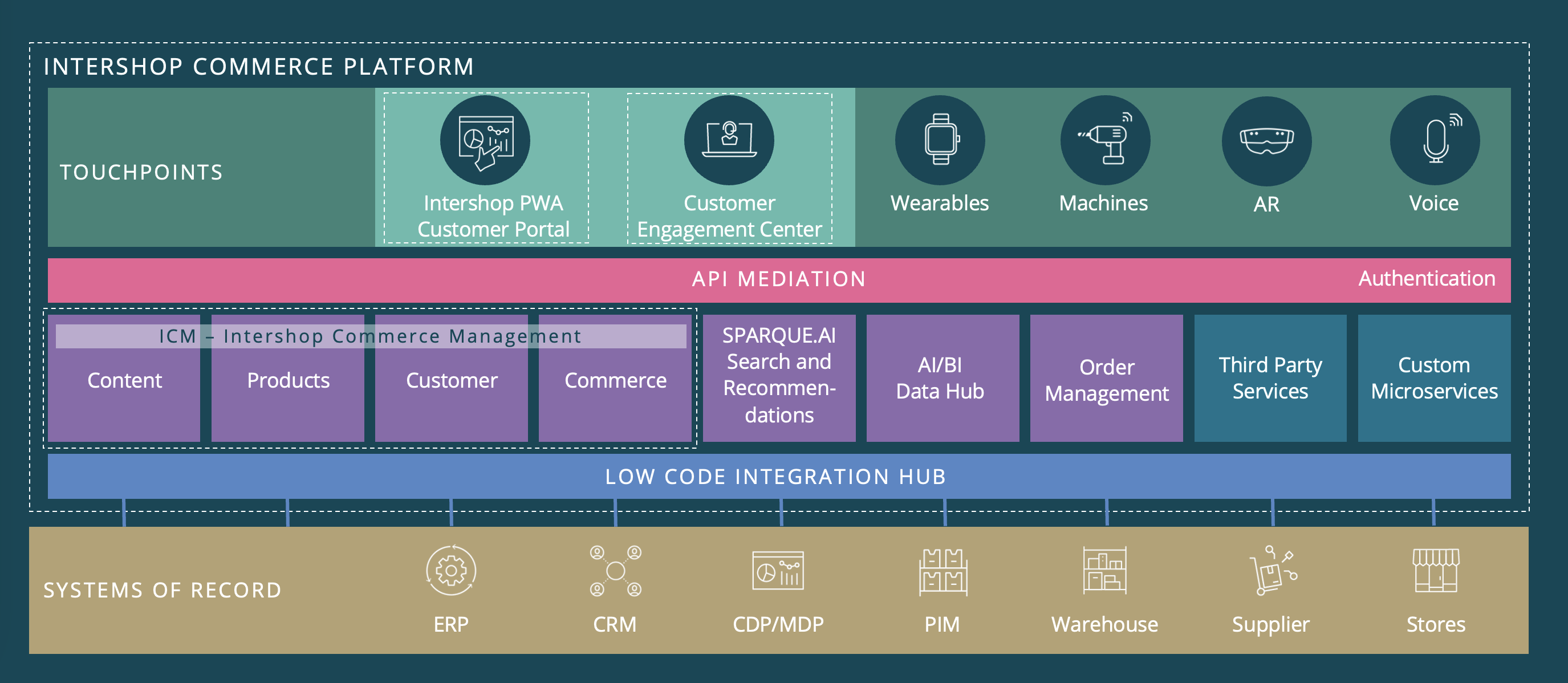
Figure 1 Architecture Overview
The Intershop Commerce Platform is typically tailored to the customer’s specific needs in a separate software customization project. The customization project is implemented by an Intershop implementation partner or Intershop Professional Services and must be ordered (legally contracted) and remunerated (paid for) separately.
To ensure the highest quality of the customer’s commerce solution, Intershop also provides non-production environments and DevOps tooling to support professional continuous integration (CI) and continuous delivery (CD) processes.
The following table gives an overview of the different core environments and clusters provided to the customer depending on the subscribed options:
|
Environments per Application |
|||||||
|
Application |
Environment |
|
ID |
Cluster |
Base Subscription |
Base Subscription plus Option “Data Replication” |
Base Subscription plus Option “Data Replication” and “Order Management” |
|
Intershop Progressive |
Production |
PRD* |
live |
X |
X |
X |
|
|
edit |
|
X |
X |
||||
|
Non Production |
User Acceptance Test |
UAT* |
live |
X |
X |
X |
|
|
edit |
|
X |
X |
||||
|
Integration |
INT* |
live |
X |
X |
X |
||
|
edit |
|
X |
X |
||||
|
Intershop Commerce Management (ICM) |
Production |
PRD |
live |
X |
X |
X |
|
|
edit |
|
X |
X |
||||
|
Non Production |
User Acceptance Test |
UAT |
live |
X |
X |
X |
|
|
edit |
|
X |
X |
||||
|
Integration |
INT |
live |
X |
X |
X |
||
|
edit |
|
X |
X |
||||
|
Intershop Order Management (IOM) |
Production |
PRD |
|
- |
- |
X |
|
|
Non Production |
User Acceptance Test |
UAT |
|
- |
- |
X |
|
|
Integration |
INT |
|
- |
- |
X |
||
*The same code base is used for live and edit, but a different domain name and link to the ICM system.
Environmenttypes:
-
The PRODUCTION (PRD) environment is used for end customers and content editors.
-
The USER ACCEPTANCE TEST (UAT) environment is intended for functional acceptance testing of new releases. It is typically initialized with pseudonymized production data to provide a realistic testing ground. However, it is important to note that this environment is optimized for a limited number of users and data (e.g., products or orders), ensuring comprehensive testing without excessive load or stress on the system as the infrastructure is not PRD-like. It is essential to highlight that UAT is not designed for load testing purposes.
-
The INTEGRATION (INT) environment is used by the development teams for integration tests.
1.2 Intershop‘s Core Responsibilities
Intershop provides the Intershop Commerce Platform in a Software-as-a-Service (SaaS)/Platform-as-a-Service (PaaS) model where Intershop is responsible for:
- Intershop’s core application environments:
- Provision, maintenance, and support of Intershop’s base applications: PWA, ICM or IOM (depending on selected package)
- Setup, operation, and support of Intershop’s application environments including all web, application, search and database services.
- Cloud Infrastructure:
- Setup, operation and support of necessary networks, virtual machines, Kubernetes clusters, load balancers, storage.
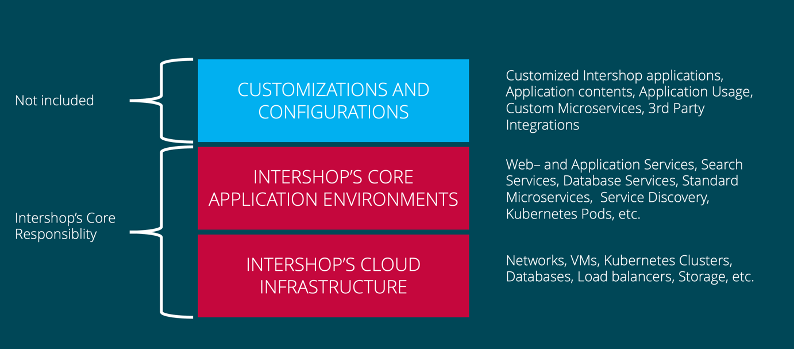
Figure 2 Intershop's Core Responsibilities
A detailed overview of the different roles and responsibilities can be found in the section 7. Roles and Responsibilities.
2. Subscription Package
2.1 Component Overview
The Intershop Commerce Platform is offered as a base subscription plus extension options.
|
Name of Component |
Subscription Inclusion Status |
|
Advanced B2B + B2C Commerce |
Included |
|
Product Information Management |
Included |
|
Web Content Management |
Included |
|
PWA Services for Intershop PWA |
Included |
|
Intershop Search (Solr) |
Included |
|
CI/CD Services (INT + UAT, DevOps Tooling) |
5 Users Included |
|
VPN to Azure |
Included |
|
Transfer Server |
Included |
|
Data Replication (Edit Cluster) |
Optional |
|
Customer Engagement Center (CEC) |
Optional |
|
BI Data Hub |
Optional |
|
Order Management System |
Optional |
|
Intershop AI Recommendations and Search (SPARQUE.AI) |
Optional |
|
Premium Support 24/7 |
Optional |
|
Agentic Commerce Package |
Optional |
2.2 Description of Components
2.2.1 Progressive Web Application (PWA) Services
Progressive Web Application (PWA) Services refer to the necessary infrastructure to run a frontend based on the Intershop PWA. The required, dedicated CI/CD services (build and deployment processes) for the Intershop PWA are included.
As with a standard ICM system, Intershop also provides three environments (PRD, UAT and INT) to run the Intershop PWA. For a data replication setup, the same PWA codebase is used for the live and edit clusters.
The provision of the service is based on container technology (Docker).
|
Note Custom PWAs based on technologies other than the Intershop PWA (e.g. React or 3rd party content management systems) can be used with the Intershop Commerce Platform using Intershop Rest APIs, but must be operated separately by the customer, partner or a 3rd party service provider. |
2.2.2 CI/CD Services
Intershop provides a pre-configured continuous integration and continuous delivery environment for ICM, IOM and PWA based on Azure DevOps.
The service includes:
- Up to 5 named users
- 1 Source code repository (GIT) per Intershop application (ICM, IOM, PWA)
- Planning and work item tracking (Azure Boards)
- One CI and one CD job in each case of Intershop applications
- An read only Maven Cache (Azure Artifacts)
- One standard container registry with 100 GB included
2.2.3 Virtual Private Network Service (VPN)
Intershop supports a dedicated virtual private network (VPN) connection between customer data center or other external back-end services and Azure to establish a secure connection.
To use this service the requirements of Azure VPN services have to be considered, see About VPN devices and IPsec/IKE parameters for Site-to-Site VPN Gateway connections in the Microsoft documentation.
The service includes:
- 10 Site2Site-tunnels
- Bandwidth 650 MBit/s
2.2.4 Transfer Server
The transfer server allows file uploads and downloads for file-based integrations (e.g. product data import) and can be used in conjunction with Intershop's transport framework.
3. Service Operation
Service operation is divided into the main phases "Setup" and "Regular Operation":
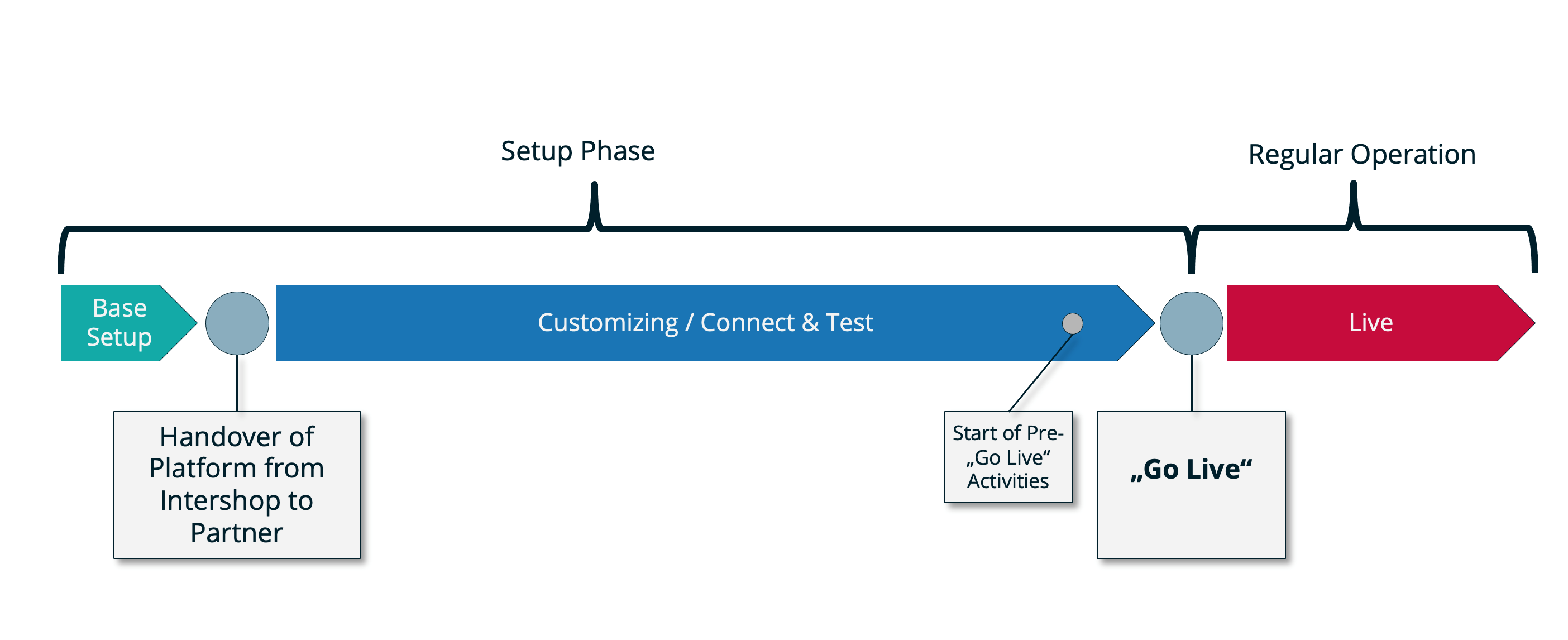
3.1 Setup Phase
To prepare the Intershop Commerce Platform for the go live, Intershop sets up the necessary system environments as described in section 1.1. In this context, the following services are provided:
3.1.1 General
During the setup phase a Service Manager from Intershop coordinates the operational activities (see below).
3.1.2 Definition and Alignment of
- CI/CD processes
- User and groups for accessing the DevOps environments and business management tools
- Rules for using and invalidating the page cache
- Backup and recovery processes
- Monitoring processes
- Reporting processes
- Emergency processes
3.1.3 Installation and Configuration
- CI/CD Services
- Installation and configuration of the application environments
- Intershop application environments
- User and access management
- Setting up monitoring and reporting
3.1.4 Rollout and Go Live
- Assistance during go-live operation to make the commerce solution accessible to end customers (according to the go-live check list)
- Increased attention in the days before and after the go live
3.1.5 Migration of an Existing E-Commerce Solution
The migration of an existing e-commerce solution (data and/or custom code) is not included in the initial setup services. Necessary infrastructure or migration support must be booked separately.
3.2 Regular Operation
3.2.1 Categories of Defects
The defect definitions, response times, and correction time limits indicated below apply to any fault which may occur in a PRODUCTION environment. Category A defects only apply to the PRODUCTION environment.
- Category A: The platform presents faults in core functions, provides wrong results, and interrupts in the PRODUCTION environment. As a result, the PRODUCTION environment is either inaccessible to end users or end users cannot place an order.
- Category B: This refers to a serious defect which occurs on a local level and only affects a single module or function. The application does not work as agreed in the specification or documentation, but it is still available. The general work on the application is not compromised and the end users can still place orders in the environment.
- Category C: Any defect not defined under A or B; this includes any subject matter which is not urgent and would require further clarification, e.g., proposals for modifications or requests for improvement.
Any defects related to the UAT and INT environments (also known as NON-PRODUCTION) will be addressed with lower priority.
3.2.2 Business Hours
Regular business hours are in general:
Monday to Friday from 09:00 to 17:00, exceptions are published on the Intershop Support website.
|
Info Premium Support including 24/7 Emergency Hotline can be booked as an additional option, see Service Levels. |
3.2.3 Support
Technical support accepts technical problems and user enquiries only during business hours. These are prioritized by the Intershop Service Desk according to their importance and then initiated for processing.
The emergency stand-by service for receiving and dealing with Category A faults is available 24/7 (only available if premium support has been booked).
3.2.4 Response Time
The response time defines the maximum time span in which the customer receives a confirmation of the progress of claims processing.
Intershop warrants the following response times in the event of malfunctions:
|
Category |
Standard Response Times |
Premium Response Times |
|
|
A |
60 minutes* |
30 minutes
|
|
|
B |
4 hours* |
2 hours* |
|
|
C |
1 day* |
1 day* |
*during business hours
On request, Intershop will provide the customer an incident report for all category A faults after the fault has been rectified (Premium Support only).
The service desk staff classifies and records all claims in the Intershop ticket system.
3.2.5 System Availability
Intershop warrants availability of the PRODUCTION environment of at least 99.6% per quarter (measured from the interface between network data center and Internet service provider). Our Premium support elevates the availability to 99.9%.
Excluded from this are:
- Events beyond Intershop's control (e.g. force majeure)
- Interruptions and disruptions due to the conduct of the customer or its subcontractors, such as misoperation of the platform (e.g. page cache deletion at peak time), import of invalid data or deployment of inperformant or faulty customizations that lead to excessive resource consumption
- Planned downtime/maintenance or load/stress/penetration/vulnerability testing windows
- Customer installations running on an outdated release (see chapter “Continuous Releases”)
3.2.6 Maintenance
Scheduled maintenance work may be necessary, for example, to perform operating system updates, install security patches or new software versions in the system. Necessary regular maintenance windows (time and duration) are agreed with the customer in advance if possible. The aim is to consolidate the maintenance windows for non-safety-relevant work in times of low sales with minimal restriction of system availability. Additional information is provided before work begins.
Maintenance windows are times during which an IT system is not available due to planned work or a severe impairment of regular operation exists.
Maintenance windows are considered planned downtimes. The total downtime per calendar month may not exceed 8 hours. For the unlikely case of a security or emergency issues Intershop will perform necessary steps with short notice to the customer.
3.2.6.1 Weekly Maintenance Slot
Duration: up to 4 hours based on activities, not more than 8 hours per month
Time slot: To be scheduled with the customer.
Services:
- Maintenance activities on infrastructure side
- Deployment of hotfixes
- Deployment of 3rd party fixes (database, application and search servers) including security updates
- Smaller modifications (template errors, spelling errors, etc.)
- Replacement / enhancement of minor components
3.2.7 Capacity Management
Capacity management includes the following:
- Ongoing monitoring of load parameters and system utilization (CPU, hard disks, network bandwidth)
- Sizing to ensure handling of traffic peaks based upon agreed plans
- Ensuring that customizations are implemented in a performant and resource efficient way
3.2.8 Performance Management
Performance management includes the following:
- Ongoing performance monitoring of critical performance parameters regarding their changes (response time behavior, etc.)
- Tuning / Optimization and configuration changes of the Intershop base applications excluding customizations
3.2.9 Security Management
Security management includes the following:
- Definition, setup and maintenance of system authorizations and accesses
- Installation of security-relevant software updates
- Installation of standard patches and hotfixes of the operating system and 3rd-party software
- Installation of standard patches and hotfixes of the Intershop applications in coordination with the implementation partner
- DDoS (Basic) protection via Microsoft Azure
3.2.10 Technical Monitoring
Technical monitoring by the Intershop operations team includes the continuous automatic monitoring of:
- Functional components of the infrastructure
- Functional components of the application environments
- Critical parameters of the Intershop application environments
Technical monitoring checks the availability of technical components and processes, but does not correct the functioning of the application in regards to business processes, content or integration of 3rd-party services. These are in the responsiblity of the implementation partner and customer, see RACI matrix.
3.2.11 Incident Management
Incident management relates to quickly rectifying technical or system malfunctions in order to minimize their impact on business operations. Included functions depend on the chosen service package:
- Provision of a ticket system for reporting and tracking errors
- Analysis of technical faults of the base applications, the core application environments and the infrastructure (not including customizations)
- Checking technical error logs
- Restoration of operation after malfunctions
- Logging of error states and system load
3.2.12 Problem Management
Problem Management is about the sustainable elimination of repeated technical reproduction of misconduct, if possible.
Furthermore, this includes the incorporation of fixes into the next release for the affected standard Intershop base application (see also Concept - Continuous Releases for details).
3.2.13 Deployments
Deployments include the installation of customizations of Intershop software.
Necessary deployments (time and duration) are planned and agreed to in advance with the customer, if possible analogous to the maintenance windows. Additional information is provided before work begins. The deployment process refers to one production environment or one non-production environment per release (version).
3.2.14 Backup and Recovery
Regular backups of the customers data are done for all databases and the shared file service.
RPO (Recovery Point Objective, data loss)
- Shared File Service: 24 hours
- The backup of shared file service for production environment takes place daily at night and does not affect proper operation.
- The backup of shared file service will be copied geo-redundant once a day to another Azure region (data center).
- Database: 5-10 minutes
- The production and non-production databases are operated as an active-active cluster.
RTO (Recovery Time Objective)
- In principle, all application tiers are designed redundantly for live production clusters to prevent downtimes in case of failure. Container-based applications are orchestrated by Kubernetes and use auto-healing mechanisms such as automated pod restarting and pod transfer to alternative nodes.
- Depending on the failure, recovery takes maximum 30 minutes. Excluded are failures caused by the deployment of faulty customer/partner releases.
- Whole platform: 24 hours (depending on severity of the failure and availability of the Azure services)
3.3 Cloud Hosting
The necessary cloud infrastructure services are provided within the framework of a subcontractor contract. Details are regulated in the DPA (data processing agreement). Intershop uses Microsoft Azure Services (Microsoft Azure Global Cloud) to provide the service. The customer hereby consents to the use of the subcontractor. Intershop is responsible for all communication and collaboration with the provider.
4. Service Levels
Intershop offers two service levels for technical support of the application:
- Standard
- Premium
The table below shows the differences in scope of the services per service level:
|
Services - Details |
Standard |
Premium |
|
|
System Availability |
Availability of Intershop's core application environments and infrastructure per quarter |
99.6 % |
99.9 % |
|
Emergency hotline (24/7) |
For category A incidents |
- |
Included |
|
Maintenance Windows |
Time and duration are coordinated with the customer in advance |
During Business Hours only |
24/7 |
|
Update Management |
Non-self-service deployments of new releases (customizations) per month |
2 |
8 |
|
Response Time |
The maximum time span in which the customer receives a confirmation of the progress of claims processing |
During Business Hours A: 60 minutes |
24/7* A: 30 minutes *only for category A incidents |
5. Optional Services
The Intershop Commerce Platform provides a set of additional services that are described below and can be flexibly booked on demand. All options have a minimum term of three months and can be cancelled in writing one month to the end of the month.
5.1 Customer Engagement Center
The customer has the option to book the Customer Engagement Center application and the associated services or to extend them.
The Customer Engagement Center allows customer service and sales representatives to respond to incoming service requests, place orders on behalf of customers, handle complaints via appeasement coupons and help customers in their daily business via co-browsing in the storefront.
Features of the Customer Engagement Center application include customer search, customer profile data overview, order history, quick order, coupon creation and customer impersonation (co-browse).
The service includes:
- Onboarding service in order to manage users of the Customer Engagement Center
- Setup of a connection to the customer`s instance of Intershop Commerce Management
- Hosting, technical monitoring and maintenance of the Customer Engagement Center application and related services (authentication and configuration services)
- Usage of the application for 10 named users
- Additional packages per additional 10 users must be booked separately
5.2 BI Data Hub
The customer has the option to book one of the BI Data Hub packages or to extend them. Each package consists of data capture services, data storage and Microsoft Power BI business reporting templates. The packages have the same functional range but different scaling capabilities.
The BI Data Hub delivers the customer a single point of truth for e-commerce business information in order to control its business.
The service includes:
- Setup and configuration of data warehouse instance and data warehouse schemas
- Provision of Power BI report templates as download (Power BI license not included):
- Basic Orders Report
- Business Report
- Extended Business Report (with order states)
- Customer-centric Report
- Hosting, technical monitoring and maintenance of the BI Data Hub application and related services.
5.3 Payment Integrations
Intershop provides a pre-integrated connector to either PAYONE or the CyberSource payment platform, if these options are selected. Customers must provide the merchant credentials (merchant ID, and API key) to connect to the payment acceptance service. The set of supported payment methods and schemes is provided by the merchant's configuration according to the contractual agreement with the selected payment provider, either PAYONE or CyberSource.
5.3.1 PCI Compliance
Intershop maintains PCI compliance in that it does not store, transmit, or manage cardholder data within its systems. All payment information within the system is performed through embedding iframes from thrid-party providers within its systems or using tokenized transactions.
5.4 Additional UAT/INT Environments
The customer has the possibility to book additional user acceptance test (UAT) and integration environments (INT) with a lead-time of 1 month. The SLA´s, which apply to the environment, are bound to the service levels agreed to in the main environment (Standard or Premium).
5.5 Upscaled UAT/INT Environments
The UAT or INT infrastructure can be enhanced to enable advanced usage scenarios:
- Load testing close to production
- Improved process chain and job tests (e.g. mass data imports)
- Code deployments without downtime
The UAT Environment Upgrade includes:
- Cluster setup of UAT application environment for Intershop Commerce Management (ICM)
- Compute resources increased by factor 4
- Cluster setup of UAT application environment for Intershop Progressive Web App Services (PWA Services)
- Compute resources increased by factor 2
- Cluster setup of UAT application environment for Intershop Order Management (IOM)
- Compute resources increased by factor 2
Further options are available based on individual agreements.
5.6 Support for Developers
This service package authorizes the customer to submit technical inquiries to Intershop’s Technical Support regarding the use of the Intershop Commerce Platform development and its APIs. Intershop will provide technical guidance and assistance to Intershop‑trained and certified developers, both for operating the platform and for customizing its functionality.
Scope of Services
- Access to the Intershop Technical Support hotline via phone or the Service Portal
- Full Service Portal access, including the Knowledge Portal and product development documentation
- Response time within eight (8) business hours
- Subscription to the quarterly Support newsletter - TechTalk
- Up to five authorized support contact individuals who may directly contact Intershop Technical Support
- Access to development‑related infrastructure resources
- Access to trainings offered by the Intershop Online Academy
5.6.1 Authorized Support Contact Individuals (ASCI)
The customer shall designate up to five (5) authorized support contact individuals (ASCI) who are permitted to submit technical inquiries to Intershop Technical Support. To ensure fast and efficient issue resolution, all ASCIs must be trained and certified by Intershop for the corresponding products in the current version. The customer may replace ASCIs at its discretion within reasonable limits.
5.6.2 Response Time
Intershop provides both a service portal and a telephone hotline for reporting technical issues. Once a technical inquiry is submitted, a ticket is automatically created in the Intershop Customer Support tracking system. All inquiries are processed in the order in which they are received and will be answered within eight (8) business hours.
5.6.3 Service Portal and Knowledge Portal
The Customer Service Portal provides a range of services and information for customers with an active support or platform contract. It enables the submission of new inquiries, the review and tracking of existing tickets, and access to relevant support resources.
The Knowledge Portal, available in English at https://knowledge.intershop.com, provides comprehensive technical documentation for the Intershop products. It includes all Intershop documentation, such as product manuals, bug descriptions, installation and maintenance guides, development documentation, release information, sample code, cartridges, and answers to frequently asked questions.
5.7 Intershop AI Recommendations and Search
Intershop AI Recommendations and Search is a cloud‑based recommendation and search service powered by SPARQUE.AI and operated as a part of the Intershop Commerce Platform.
All operational, hosting, maintenance, update, and support processes follow the general provisions of this Service Description.
The functional capabilities of the service are defined in the SPARQUE Feature List.
5.8 Data Replication System
Intershop’s data replication in general refers to the process of 1) updating data in a source system (edit system) and 2) synchronizing the data with a target system (live system). The replication mechanism allows to create and maintain content (product information, web content components, promotions, etc.) in the background (i.e., in a source system being offline to the public) without disturbing the online target system. This also includes running jobs, process chains or mass data imports.
|
Note It is highly advisable to decide whether to incorporate a data replication system before commencing the implementation project. Adding it later will result in additional costs. |
5.9 Agentic Commerce Package
The Agentic Commerce Package is Intershop’s unified commercial model for AI-powered commerce. Instead of purchasing individual AI agents or features, customers subscribe to one package that provides flexible access to multiple AI agents and copilots. This approach makes it easier to start with AI, scale over time, and maintain full control over costs.
For details, see https://www.intershop.com/en/legal.
6. Customer Obligations
6.1 General Obligations
The customer must guarantee the following:
- Legality of all contents of the online shops and data collection
- Provision of the necessary system access and authorizations for Intershop regarding any 3rd party systems
- Contact person by name for ongoing communication between Intershop and the customer, for example for:
- Planning and execution of deployments
- Planning and implementation of changes to the system architecture
- Timely decisions
- Other measures that influence the proper provision of services through Intershop
- Definition and announcement of a maintenance window to Intershop (see 3.2.6 Maintenance)
- A maintenance contract with an implementation partner or Intershop professional services must be in place to maintain and support the customizations and to guarantee the fulfillment of the responsibilities of the partner role (see 7. Roles and Responsibilities)
6.2 Prerequisites for Customers
The customer is obligated to appoint at least one contact person for questions during setup and later regarding operational support. Contact persons must be trained by Intershop or hold certification, meaning that each contact person has at least a minimum knowledge about the Intershop Commerce Platform.
The following knowledge is required:
- Back office functionalities in general
- Knowledge of the main processes
6.3 Technical Requirements
In order to fulfill the service by Intershop, the customer needs to provide the following:
- E-Mail service to relay any mails generated while using the service
- All required SSL/TLS certificates required for proper operation of the service
- Access to the required backend services (PIM, ERP or others) which can be provided via VPN or public internet depending on customers’ requirements
- Customer's access to the service
The access to the service (frontend and back office) only requires an internet web browser. Intershop recommends using one of the following web browser in the latest version:
- Mozilla Firefox
- Google Chrome
- Microsoft Edge
6.4 Continuous Releases
The Intershop Commerce Platform is updated regularly in order to ensure security and to enhance functionality. This also affects the ICM, IOM or PWA application that may contain customized code developed by the customer or by an Intershop implementation partner on behalf of the customer. Therefore, the customer is accountable to make sure that a supported ICM, IOM and PWA base version is used to build and run customizations.
A detailed description of the release concept for the different applications can be found in the Intershop Knowledge Base at Concept - Continuous Releases. An overview of the product releases incl. EOL and EOS dates can be found in the Product Calendar.
In case a customer is using an outdated Intershop release, Intershop can no longer ensure the agreed-upon SLAs, availabilities, and system security and is allowed to cancel the contract. Furthermore, any investigations into problems or incidents must then be commissioned as part of an additional legacy support contract or on a time and material basis.
7. Roles and Responsibilities
The Intershop platform is typically tailored to the customer’s specific needs in a separate software customization project which involves an implementation partner.
The following RACI matrix shows the different roles and their responsibilities in the development, operation, and support of a customized platform.
- Role Customer – The subscriber of the Intershop Commerce Platform, the party who is selling products and services using the platform.
- Role Partner – The Intershop implementation partner customizing the platform. The partner must be ordered and remunerated separately. Intershop Professional Services can take over the partner role.
- Role Intershop – The Intershop team operating and supporting the base applications, the application environments, and the cloud infrastructure of the Intershop Commerce Platform.
|
R |
Responsible |
General: Who completes the task(s). Specific: The party that is assigned to do the work |
|
A |
Accountable |
General: Who oversees that the overall work gets done Specific: Makes the final decision and has the ultimate ownership |
|
C |
Consulted |
General: Who will be communicated with before decisions are made and actions taken Specific: Must be consulted before a decision or action is taken |
|
I |
Informed |
General: Who will be updated on decisions made and actions taken during the project Specific: Must be informed that a decision or action has been taken |
|
|
Topic |
Intershop |
Partner |
Customer |
|
Availability
|
Availability of Intershop's core application environments and infrastructure |
R/A |
C |
I |
|
Availability of customized Intershop applications |
C |
R/A |
I |
|
|
Service Desk
|
1st level - Support for customized Intershop applications |
- |
R/A |
C |
|
2nd level - Support for Intershop application environment, infrastructure and standard Intershop applications |
R/A |
C |
I |
|
|
Update |
Creation of customer-specific solutions derived from the Intershop applications, based on a currently supported major release and its latest hotfix. |
C |
R |
A |
|
|
Deployment of customized Intershop applications (depending on self-service deployment) |
R |
R |
A |
|
|
Definition of individual maintenance windows |
R/A |
C |
C |
|
Security
|
Adoption of latest available security fixes in the implementation project of the customized Intershop applications |
I |
R/A |
C |
|
Installation of security patches for the operating systems, databases, web servers, Kubernetes clusters and other infrastructure components |
R/A |
I |
I |
|
|
Capacity
|
Ensuring that adequate infrastructure capacity is available at all times to meet the agreed revenue targets |
R/A |
C |
C |
|
Communication on significant future changes of platform utilization |
I |
R |
A |
|
|
Performance
|
Ongoing performance monitoring of the customized Intershop applications |
C |
R/A |
I |
|
Ongoing performance monitoring of the Intershop application environment and infrastructure |
R/A |
I |
I |
|
|
Tuning and optimization of customized Intershop applications |
- |
R/A |
C |
|
|
Monitoring
|
Technical monitoring of the Intershop application environment and infrastructure |
R/A |
I |
I |
|
Business process monitoring (jobs, replication processes, order exports, etc.) |
- |
R/A |
C |
|
|
Availability of additional external services (recommendation engine, rating systems, payment, etc.) |
C |
R |
A |
|
|
Periodic checks of log files |
- |
R/A |
I |
|
|
Incident Management (Sudden operational defect, downtime)
|
Initial root cause analysis to determine if the incident is caused by infrastructure/application environment or customized Intershop application |
R/A |
C |
I |
|
Root cause is in the area of infrastructure/application environment: |
R/A |
C |
I |
|
|
Root cause is in area of customized application: |
C |
R/A |
I |
|
|
Problem Management
|
Root cause analysis |
C |
R/A |
I |
|
Intershop proprietary code: Development of hotfix release for the affected standard Intershop base application |
R/A |
C |
I |
|
|
Problem in custom code: Creation of new project release containing appropriate fixes |
- |
R/A |
C |
|
|
Test and confirmation of resolution |
- |
R |
A |